
How to deploy for external TLS VIP access

This guide goes over an example deployment of PostgreSQL, PgBouncer and HAcluster that require external TLS/SSL access via Virtual IP (VIP).
It combines the following guides, where you can find more detailed information:
Requirements
Although Canonical does not prescribe how you should set up your environment, we can provide recommendations. Consider contacting us for support with your use-case.
The basic requirements to follow along with this example setup are the following:
A fully deployed and running Juju machine environment
See the Charmed PostgreSQL Tutorial for a quick setup with Multipass
See the official Juju setup guide for more details
A spare virtual IP address for
haclusterSee the PgBouncer guide: How to use a VIP to connect to PgBouncer
DNS record pointing to VIP above (
my-tls-example-db.localis used as an example here)
Design
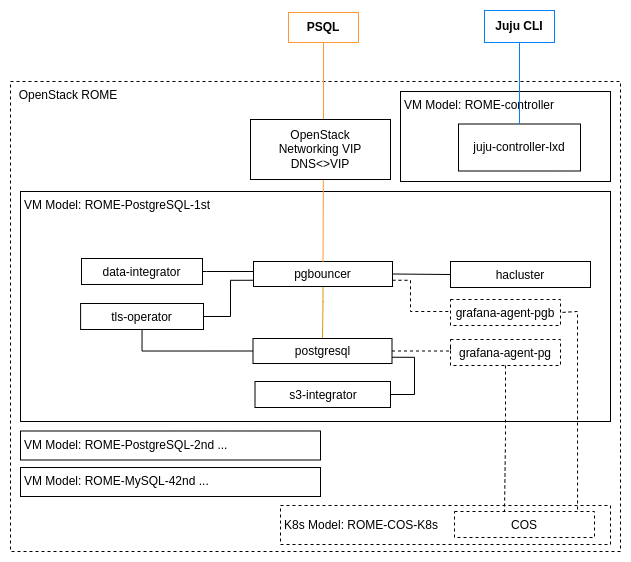
This setup deploys the following components:
The
postgresqlcharm (3 units, as a single cluster).The
self-signed-certificatescharm as the TLS provider.Note that this is not suitable for production deployments. See the guide: Security with X.509 certificates.
The
data-integratorcharm as a principal charm for the subordinated charms below (3 units for high availability):The latest
pgbouncercharm as a load-balancer and connection pooler (3 units).The
haclustercharm for VIP handling (3 units are the minimum for HA).(optional) The COS
grafana-agentcharm for Monitoring purposes.
Deploy components
Create a Juju model if you haven’t already:
juju add-model my-external-tls-db
Deploy postgresql and self-signed-certificates:
juju deploy postgresql --channel 16/stable -n 3
juju deploy self-signed-certificates
juju integrate postgresql self-signed-certificates
Deploy pgbouncer from the 1/stable channel and configure it with your VIP:
juju deploy pgbouncer --channel 1/stable --config vip=10.20.30.40
juju integrate pgbouncer postgresql
juju integrate pgbouncer self-signed-certificates
Deploy data-integrator with 3 units and configure the database name of your choice. In this example, we use mytestdb:
juju deploy data-integrator -n 3 --config database-name=mytestdb
juju integrate data-integrator pgbouncer
Deploy hacluster:
juju deploy hacluster
juju integrate hacluster pgbouncer
juju integrate hacluster:juju-info data-integrator
Example juju status output:
Model               Controller  Cloud/Region         Version  SLA          Timestamp
my-external-tls-db  lxd         localhost/localhost  3.5.5    unsupported  12:53:35+01:00

App                       Version  Status  Scale  Charm                     Channel        Rev  Exposed  Message
data-integrator                    active      3  data-integrator           latest/stable   78  no
hacluster                 2.1.2    active      3  hacluster                 2.4/stable     131  no       Unit is ready and clustered
pgbouncer                 1.21.0   active      3  pgbouncer                 1/stable       396  no       VIP: 10.78.217.100
postgresql                16.9     active      3  postgresql                16/stable      843  no
self-signed-certificates           active      1  self-signed-certificates  latest/stable  155  no

Unit                         Workload  Agent  Machine  Public address  Ports     Message
data-integrator/0            active    idle   4        10.78.217.30
  hacluster/3                active    idle            10.78.217.30              Unit is ready and clustered
  pgbouncer/0*               active    idle            10.78.217.30    6432/tcp  VIP: 10.78.217.100
data-integrator/1            active    idle   5        10.78.217.132
  hacluster/2                active    idle            10.78.217.132             Unit is ready and clustered
  pgbouncer/1                active    idle            10.78.217.132   6432/tcp
data-integrator/2*           active    idle   6        10.78.217.93
  hacluster/1*               active    idle            10.78.217.93              Unit is ready and clustered
  pgbouncer/2                active    idle            10.78.217.93    6432/tcp
postgresql/0                 active    idle   0        10.78.217.254   5432/tcp
postgresql/1                 active    idle   1        10.78.217.245   5432/tcp
postgresql/2*                active    idle   2        10.78.217.192   5432/tcp  Primary
self-signed-certificates/0*  active    idle   3        10.78.217.79

Machine  State    Address        Inst id        Base          AZ  Message
0        started  10.78.217.254  juju-318984-0  ubuntu@22.04      Running
1        started  10.78.217.245  juju-318984-1  ubuntu@22.04      Running
2        started  10.78.217.192  juju-318984-2  ubuntu@22.04      Running
3        started  10.78.217.79   juju-318984-3  ubuntu@22.04      Running
4        started  10.78.217.30   juju-318984-4  ubuntu@22.04      Running
5        started  10.78.217.132  juju-318984-5  ubuntu@22.04      Running
6        started  10.78.217.93   juju-318984-6  ubuntu@22.04      Running
Check connectivity
To test the connection to PostgreSQL via TLS, first get the credentials via data-integrator:
juju run data-integrator/leader get-credentials
...
postgresql:
  data: '{"database": "mytestdb", "external-node-connectivity": "true", "requested-secrets":
    "[\"username\", \"password\", \"tls\", \"tls-ca\", \"uris\"]"}'
  database: mytestdb
  endpoints: 10.78.217.100:6432
  password: V7kHqHyapIphkUS0cHoOtP3j
  subordinated: "true"
  uris: postgresql://relation_id_9:V7kHqHyapIphkUS0cHoOtP3j@10.78.217.100:6432/mytestdb
  username: relation_id_9
  version: "14.12"
Now use the received credentials (uris) to connect PostgreSQL (via TLS/SSL):
> psql postgresql://relation_id_9:V7kHqHyapIphkUS0cHoOtP3j@10.78.217.100:6432/mytestdb
psql (14.15 (Ubuntu 14.15-0ubuntu0.22.04.1), server 14.12 (Ubuntu 14.12-0ubuntu0.22.04.1))
SSL connection (protocol: TLSv1.3, cipher: TLS_AES_256_GCM_SHA384, bits: 256, compression: off)
Type "help" for help.

mytestdb=> select now();
              now
-------------------------------
 2025-01-14 11:51:04.646245+00
(1 row)
Ensure your DNS records points to the virtual IP and that it is routable/reachable from outside of your network to connect using DNS:
psql postgresql://relation_id_9:V7kHqHyapIphkUS0cHoOtP3j@my-tls-example-db.local:6432/mytestdb
Add monitoring
We recommend adding the Canonical Observability Stack (COS) to your setup for monitoring, alert rules, logs, and tracing.
See also: How to enable monitoring and How to enable monitoring (PgBouncer).
High availability
At this point, Juju is responsible for the health of the clusters/applications:
The PostgreSQL charm will restart the workload if PostgreSQL is not healthy.
The Juju agent will restart the unit/vm/container if it is no longer reachable/healthy (in the same AZ).
The Juju controller will make sure Juju agent is up and running and charm is healthy.
The HA Cluster charm will make sure the VIP is always reachable and routes to a single PgBouncer.
PgBouncer will balance incoming connections and makes sure write traffic goes to the primary PostgreSQL unit.
The TLS operator (in this example, the
self-signed-certificatescharm) is responsible for providing all components with signed ready-to-use TLS artifacts.
Multiple availability zones
In production environments, deploy different units into separate availability zones (AZ).