
Managed Apache Kafka on Azure
Canonical Managed Apache Kafka is an Azure Marketplace offering that deploys Charmed Apache Kafka into your own Azure subscription as an Azure Managed Application. The resources run in your subscription and are billed through Azure, while Canonical operates them on your behalf.
This page explains how a deployment is laid out, who can do what with each part of it, and what the choices you make at deployment time mean. For the step-by-step deployment procedure, see How to deploy Managed Apache Kafka on Azure.
Note
This offering is different from a self-managed deployment with Juju on Azure, which you operate yourself. For that, see How to deploy on Azure.
Resource groups
Every deployment creates three resource groups in your Azure subscription. Each one isolates a different part of the deployment and has its own access control assignments.
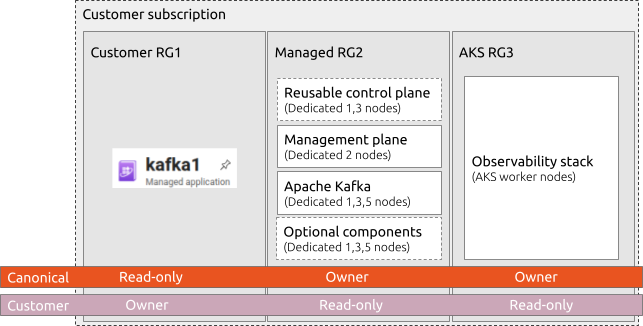
Resource groups and access levels of a deployment
Customer resource group
The customer resource group holds a single resource: the managed application itself. You choose or create this resource group when you deploy the offering. You are its owner, and Canonical can only read it.
Managed resource group
The managed resource group holds the virtual machines that run the service: the control plane, the management plane, the brokers, and the controller VMs. For their roles, see Components. You can set its name at deployment time.
Canonical is the owner of this resource group so that it can operate the deployment without your intervention. You keep read-only access to audit what runs there.
AKS resource group
The AKS resource group holds an Azure Kubernetes Service (AKS) cluster whose worker nodes run the Canonical Observability Stack: Prometheus for metrics, Loki for logs, and Grafana for dashboards. Keeping observability in its own resource group isolates it from the Apache Kafka workload. Access control is the same as for the managed resource group.
Components
The managed resource group contains several groups of virtual machines, each with a distinct role.
Apache Kafka brokers
The broker VMs run Apache Kafka and serve your client applications. By default, the brokers also run the KRaft controllers that manage cluster metadata, so a deployment needs no separate controller machines.
You can choose to run the KRaft controllers on the controller VMs instead. This decouples the number of KRaft controllers from the number of brokers: for example, you can keep three controllers while scaling the brokers to a larger number. Separate KRaft controllers are required for production deployments that use ephemeral storage for the brokers, which is the default disk type, so that the cluster metadata does not depend on broker disks that do not persist.
Management plane
Two dedicated management VMs give Canonical’s operations team a secure point of access to your deployment. Canonical uses them to run day-2 operations.
Control plane
The control plane orchestrates the deployed components. A deployment either provisions its own control plane or reuses an existing one created by the Canonical Managed Juju deployment offering on Azure Marketplace. Reusing a control plane across several managed deployments lowers the cost of each one.
Controller VMs
All non-broker components that you enable share one group of controller VMs, separate from the brokers. The diagram shows them as optional components:
KRaft controllers, if you choose to run them outside the brokers.
Kafka UI, based on Kafbat, to inspect the deployed components from a web interface.
Karapace for a schema registry.
Kafka Connect to stream data between Apache Kafka and other systems.
The controller VMs are only created if you enable at least one of these components. For more information on each component, see Components overview.
High availability
The number of VMs you select for the control plane, the brokers, and the controller VMs determines whether a deployment is eligible for a service level agreement (SLA). Only deployments with at least three VMs for each of them are backed by an SLA, and the number of controller VMs must be odd. A single VM for each is suitable for non-production environments.
A single VM has no redundancy: if it fails, the components it runs are unavailable until the VM is restored. Three or more VMs let a component tolerate the loss of a machine. For the brokers, your data also survives the loss of a machine only if your topics have a replication factor greater than one.
Network connectivity
Client applications reach the brokers and Kafka UI in one of two ways:
Virtual network peering. The deployment peers with an existing Azure virtual network (VNet) in which your applications run. Traffic stays on private addresses. The automation does not create new virtual networks for you, so the VNet and subnet must exist before you deploy. Their address range must not overlap with the range that the deployment reserves in the managed resource group. This is the recommended option.
Public IP addresses. The brokers and Kafka UI get public IP addresses. Inbound access is open to any source (
0.0.0.0/0) unless you restrict it to a list of IPv4 CIDR ranges at deployment time.
The monitoring dashboards always use public IP addresses, whichever option you choose.
Credentials
A deployment has a separate username and password for each of the following:
Apache Kafka brokers. The account is the
operatoruser, which you can use to create further user accounts.Kafka UI, if enabled. The account has read-only access.
You set both passwords in the deployment wizard. When the deployment completes, Canonical sends the connection details in a follow-up email:
the broker endpoints and username
the security protocol and SASL mechanism to use with the brokers
the Kafka UI URL and username, if enabled
the CA certificates that clients must trust to communicate with the brokers
The email does not include the passwords. For an example client configuration, see Connect a client.
Billing
The offering is sold under the Microsoft Standard Contract and billed hourly through your Azure subscription. The Azure infrastructure that the deployment creates, such as VMs, disks, and the AKS cluster, is billed to the same subscription. Review the pricing for your selected plan on the Azure Marketplace listing.