



Security
MicroCloud’s security model is based on explicit trust and secure-by-default components. Each MicroCloud deployment consists of independently secured components (LXD, MicroCeph, and MicroOVN), each enforcing authentication, encryption, and access control within its own domain.
MicroCloud further enforces security through the use of mutual TLS (mTLS), certificate-based identities, and an explicit trust establishment mechanism. Its deployment as a collection of signed, confined snaps on Ubuntu further strengthens its overall security posture.
Ubuntu security
MicroCloud runs on Ubuntu and benefits from all Ubuntu platform security measures, including kernel hardening, signed packages, and continuous security maintenance. For production environments, we recommend using a recent Ubuntu LTS release to ensure long-term support and predictable security updates.
Ubuntu LTS releases subscribed to Ubuntu Pro can use the Ubuntu Security Guide (USG) for CIS hardening. Refer to the LXD documentation on Ubuntu CIS hardening for related details about auditing LXD hosts with USG.
Snaps and supported versions
The MicroCloud team maintains both Long Term Support (LTS) and feature releases. See Releases and snaps and our Release notes for details about the currently supported releases.
MicroCloud and its components are distributed as snaps, which enhances security by providing a confined environment with a streamlined update mechanism. Both LTS and feature channels receive regular security updates through Canonical’s official infrastructure.
All snaps are digitally signed using assertions to guarantee authenticity and integrity.
Security reporting and disclosure
MicroCloud adheres to the Ubuntu disclosure policy. Report potential security issues privately through GitHub by filing a security advisory. Please include a clear description of the issue, affected MicroCloud versions, reproduction steps, and any known mitigation strategies. Refer to the MicroCloud security policy for details.
MicroCloud
Cryptography
MicroCloud manages cluster membership and encrypted communication through mTLS and certificate-based identities. When a machine joins a cluster, it verifies the cluster’s certificate fingerprint and receives the complete set of member certificates, establishing a consistent trust store.
During the join process, MicroCloud uses an explicit trust establishment mechanism designed to prevent secret leakage and mitigate
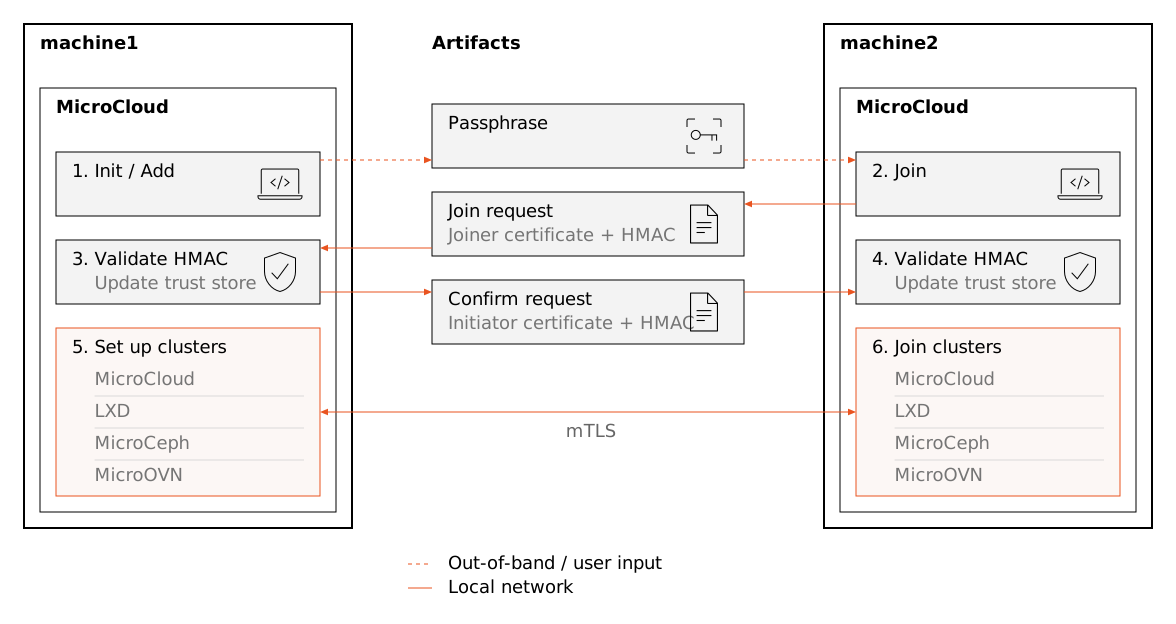
MicroCloud join process
MicroCloud uses a passphrase to generate the HMAC. If you begin the join process in interactive mode, then MicroCloud generates the passphrase as a concatenation of four words randomly selected from the EFF short list of words with unique three-character prefixes. Using this list means that you only need to type the first three characters of each word for the remainder to be guessed with auto-completion. MicroCloud displays this passphrase on the member initiating the process, and you must input the passphrase on the joining member. If, however, you use a preseed file to automate the initialization process, then you must specify the passphrase yourself.
On the joining member, MicroCloud uses the Argon2 function to generate a key from the passphrase and a random salt.[1] The joiner then sends a request to the initiator that contains the joiner’s public certificate, the random salt, and an HMAC created from the Argon2 key and the body of the request. The initiator uses the passphrase to validate the HMAC and, if the HMAC is valid, adds the joiner’s certificate to a temporary trust store. The initiator then sends its own public certificate and an HMAC back to the joiner, which similarly uses the passphrase to validate the HMAC.
Once the initiator and joiner have exchanged certificates, they can establish mTLS and use that channel to form the MicroCloud, LXD, MicroCeph, and MicroOVN clusters. The MicroCloud, MicroCeph, and MicroOVN Dqlite clusters are created with MicroCluster and the LXD cluster is set up with Dqlite alone.
The passphrase used for joining is never transmitted over the network. The join process also enforces rate limits and session timeouts to reduce the risk of replay and brute-force attacks.
For further information about how MicroCloud establishes trust, refer to the public specification.
Logging
MicroCloud creates logs through systemd. These logs can be accessed with sudo snap logs microcloud.
LXD
For details on LXD’s security architecture and operational guidance, see the LXD security overview and the LXD hardening guide.
MicroCeph
The MicroCeph security documentation provides information on encryption, authentication, best practices for secure deployment and operation, and more.
MicroOVN
MicroOVN secures its network endpoints using the TLS protocol (version 1.2 or higher), along with P-384 elliptic curve keys. For details, refer to the MicroOVN documentation on cryptography, working with TLS, and the MicroOVN security process.