
How to enable monitoring and logging
This guide provides instructions for integrating Charmed Valkey with the Canonical Observability Stack (COS). After you integrate the two, COS receives:
metrics from a Redis exporter that runs next to each Valkey unit
the Valkey and Sentinel logs
a Grafana dashboard and the alert rules that ship with the charm
It also shows where each unit keeps its log files and how they rotate.
Prerequisites
You have deployed Charmed Valkey. See How to deploy.
You have deployed COS Lite in a Kubernetes model. See Deploy COS Lite using Terraform.
Note
The Best practice is using a dedicated model for COS deployment.
This guide uses the following placeholders:
<cos_controller>is the Kubernetes controller that hosts COS<cos_model>is the model where COS (or COS Lite) runs<valkey_controller>is the controller that hosts Charmed Valkey<valkey_model>is the model where Charmed Valkey runsvalkeyis the name of the Charmed Valkey application. Replace it if you deployed it under another name.
Connection options
You can connect Charmed Valkey to COS in two ways:
Separate models (recommended): COS runs in its own model. Offers connect the two models and an OpenTelemetry Collector sends the data to COS.
Same model: Charmed Valkey runs on Kubernetes in the same model as COS. You integrate the COS applications with Charmed Valkey directly.
Separate models
Offer the COS endpoints
The COS Lite Terraform module creates the offers below for you. If you deployed COS Lite another way, create them from the COS model:
juju switch <cos_controller>:<cos_model>
juju offer grafana:grafana-dashboard grafana-dashboards
juju offer loki:logging loki-logging
juju offer prometheus:receive-remote-write prometheus-receive-remote-write
Consume the offers
Switch to the Charmed Valkey model and consume the offers:
juju switch <valkey_controller>:<valkey_model>
juju consume <cos_controller>:admin/<cos_model>.grafana-dashboards
juju consume <cos_controller>:admin/<cos_model>.loki-logging
juju consume <cos_controller>:admin/<cos_model>.prometheus-receive-remote-write
These URLs assume that the admin user owns the COS model. To list the exact URLs, run
juju find-offers <cos_controller>:.
Deploy the OpenTelemetry Collector
The OpenTelemetry Collector reads metrics, logs, dashboards and alert rules from Charmed Valkey and sends them to COS.
The opentelemetry-collector charm runs as a
subordinate on each Valkey machine. It gets its data from Charmed Valkey over the cos-agent
endpoint.
Deploy the collector and integrate it with Charmed Valkey:
juju deploy opentelemetry-collector --channel 0.130/stable --base ubuntu@26.04
juju integrate valkey:cos-agent opentelemetry-collector
Integrate the collector with the consumed offers:
juju integrate opentelemetry-collector:send-remote-write prometheus-receive-remote-write
juju integrate opentelemetry-collector:send-loki-logs loki-logging
juju integrate opentelemetry-collector:grafana-dashboards-provider grafana-dashboards
The collector pushes data to the addresses that COS advertises through its ingress, so each Valkey machine must reach those addresses.
The opentelemetry-collector-k8s charm runs as
its own application in the Valkey model. Charmed Valkey uses three endpoints: metrics-endpoint,
grafana-dashboard and logging.
Deploy the collector and integrate it with Charmed Valkey:
juju deploy opentelemetry-collector-k8s --channel 0.130/stable --trust
juju integrate valkey:metrics-endpoint opentelemetry-collector-k8s:metrics-endpoint
juju integrate valkey:grafana-dashboard opentelemetry-collector-k8s:grafana-dashboards-consumer
juju integrate valkey:logging opentelemetry-collector-k8s:receive-loki-logs
Integrate the collector with the consumed offers:
juju integrate opentelemetry-collector-k8s:send-remote-write prometheus-receive-remote-write
juju integrate opentelemetry-collector-k8s:send-loki-logs loki-logging
juju integrate opentelemetry-collector-k8s:grafana-dashboards-provider grafana-dashboards
The collector pushes data to the addresses that COS advertises through its ingress, so the Kubernetes cluster that runs the collector must reach those addresses.
If COS serves its ingress over TLS, integrate the collector’s receive-ca-cert endpoint with the
charm that provides the ingress CA.
Check both models and wait until every application is active and idle:
juju status -m <valkey_controller>:<valkey_model>
juju status -m <cos_controller>:<cos_model>
The Charmed Valkey model then looks like this:
Model      Controller  Cloud/Region         Version  SLA          Timestamp
valkey-vm  lxd         localhost/localhost  3.6.28   unsupported  07:50:15+04:00

SAAS                             Status  Store  URL
grafana-dashboards               active  k8s    admin/cos.grafana-dashboards
loki-logging                     active  k8s    admin/cos.loki-logging
prometheus-receive-remote-write  active  k8s    admin/cos.prometheus-receive-remote-write

App                      Version  Status  Scale  Charm                    Channel       Rev  Exposed  Message
opentelemetry-collector  0.130.0  active      3  opentelemetry-collector  0.130/stable  561  no
valkey                            active      3  valkey                   9/edge        115  no

Unit                          Workload  Agent  Machine  Public address  Ports                      Message
valkey/0*                     active    idle   0        10.42.6.156     6379-6380,26379-26380/tcp
  opentelemetry-collector/2   active    idle            10.42.6.156
valkey/1                      active    idle   1        10.42.6.3       6379-6380,26379-26380/tcp
  opentelemetry-collector/0*  active    idle            10.42.6.3
valkey/2                      active    idle   2        10.42.6.151     6379-6380,26379-26380/tcp
  opentelemetry-collector/3   active    idle            10.42.6.151

Machine  State    Address      Inst id        Base          AZ   Message
0        started  10.42.6.156  juju-7f9a80-0  ubuntu@26.04  xof  Running
1        started  10.42.6.3    juju-7f9a80-1  ubuntu@26.04  xof  Running
2        started  10.42.6.151  juju-7f9a80-2  ubuntu@26.04  xof  Running
Model       Controller  Cloud/Region     Version  SLA          Timestamp
valkey-k8s  lxd         k8s-lxd/default  3.6.28   unsupported  08:09:05+04:00

SAAS                             Status  Store  URL
grafana-dashboards               active  k8s    admin/cos.grafana-dashboards
loki-logging                     active  k8s    admin/cos.loki-logging
prometheus-receive-remote-write  active  k8s    admin/cos.prometheus-receive-remote-write

App                          Version  Status  Scale  Charm                        Channel       Rev  Address        Exposed  Message
opentelemetry-collector-k8s  0.130.1  active      1  opentelemetry-collector-k8s  0.130/stable  272  10.152.183.88  no
valkey                                active      3  valkey                       9/edge        115  10.152.183.85  no

Unit                            Workload  Agent  Address     Ports  Message
opentelemetry-collector-k8s/0*  active    idle   10.1.0.2
valkey/0*                       active    idle   10.1.0.236
valkey/1                        active    idle   10.1.0.104
valkey/2                        active    idle   10.1.0.204
Same model
Note
Use this method only if Charmed Valkey runs on Kubernetes in the same model as COS. Otherwise, use separate models.
In this setup you do not need the offers or the collector. Integrate the COS applications with Charmed Valkey directly:
juju switch <cos_controller>:<cos_model>
juju integrate valkey:metrics-endpoint prometheus
juju integrate valkey:grafana-dashboard grafana
juju integrate valkey:logging loki
Next, follow the steps in Open the Valkey dashboard. For the
remainder of this guide, replace <valkey_model> with <cos_model>.
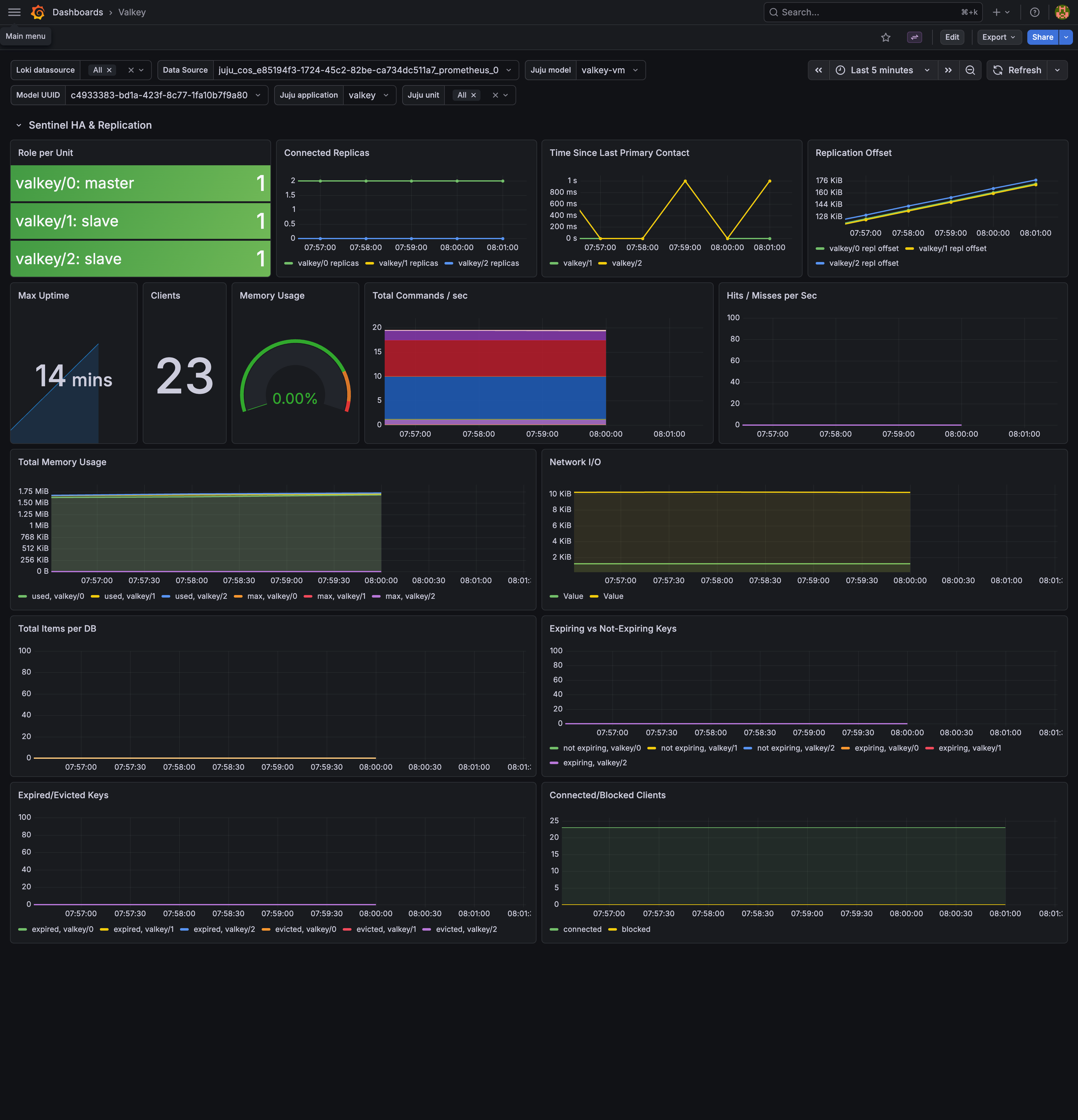
Open the Valkey dashboard
Get the Grafana URL and the admin password:
juju run grafana/leader get-admin-password --model <cos_controller>:<cos_model>
The output looks like this:
admin-password: <password>
url: http://<cos_ingress_address>/<cos_model>-grafana
Open the URL and log in as admin with that password. Go to Dashboards and open the
Valkey dashboard.
View logs
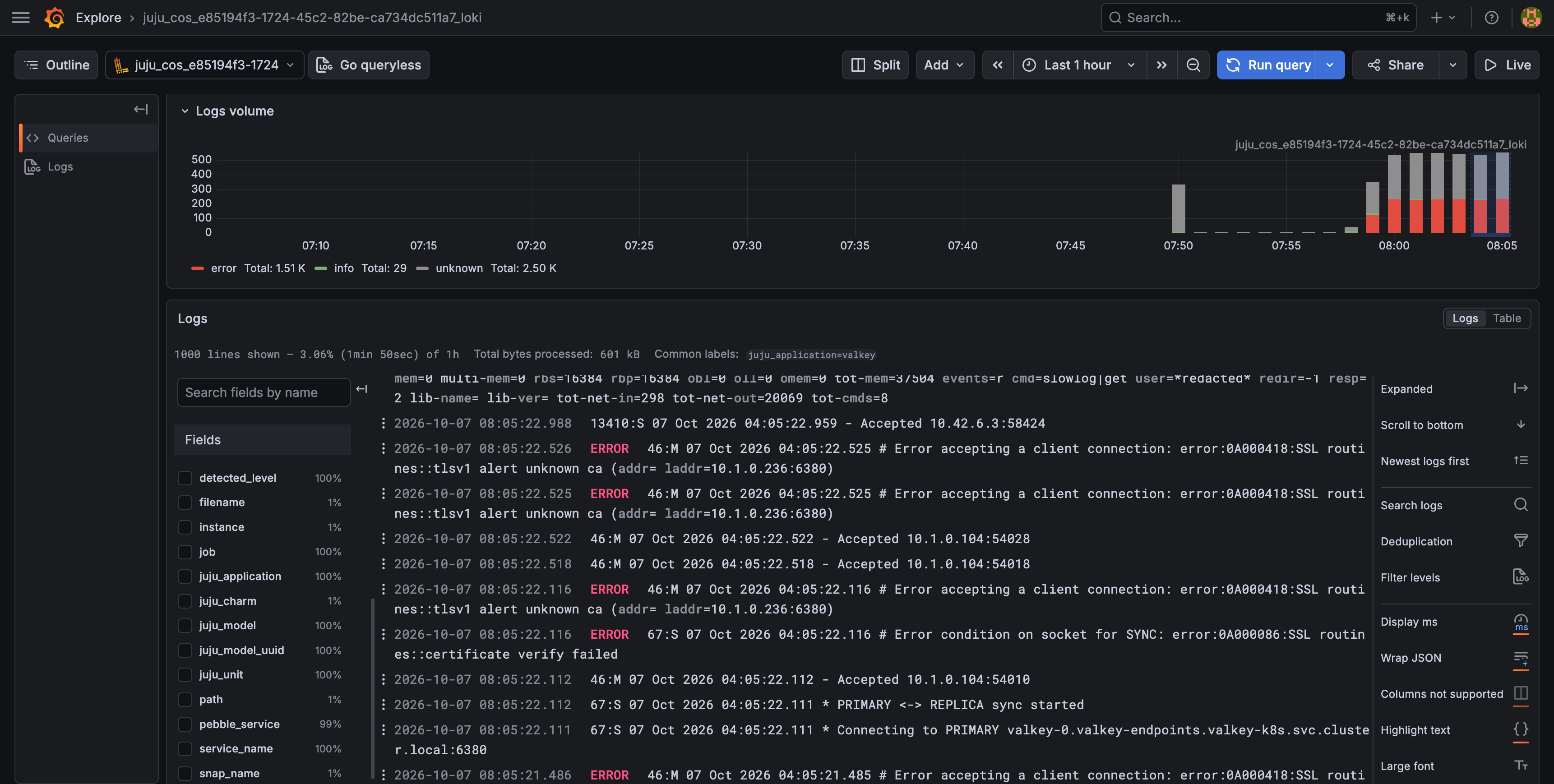
Loki receives the Valkey and Sentinel logs. To read them, open Explore in
Grafana, pick the Loki data source and filter on juju_application="valkey".
Each unit also keeps the log files on disk:
valkey.log and sentinel.log are in /var/snap/valkey-charmed/common/var/log/valkey/. The
directory belongs to snap_daemon, so list it with sudo:
juju ssh valkey/0 sudo ls -l /var/snap/valkey-charmed/common/var/log/valkey/
The output looks like this:
total 32
-rw-r--r-- 1 snap_daemon snap_daemon  1683 Oct  7 03:46 sentinel.log
-rw-r--r-- 1 snap_daemon snap_daemon 23722 Oct  7 04:13 valkey.log
valkey.log and sentinel.log are in /var/log/valkey/ in the valkey container:
juju ssh --container valkey valkey/0 ls -l /var/log/valkey/
The output looks like this:
total 616
drwxrws--- 2 root     170  16384 Oct  7 03:55 lost+found
-rw-r--r-- 1 _daemon_ 170    743 Oct  7 03:57 sentinel.log
-rw-r--r-- 1 _daemon_ 170 602834 Oct  7 04:14 valkey.log
Both files rotate daily, or earlier once one passes 200 MB. Rotated files are kept for up to 10
days, 14 files at most. All but the newest are compressed, so the names are valkey.log.1,
valkey.log.2.gz, and so on.
Important
For production environments, use a logs volume of at least 8 GB.
To set the logs volume size when you deploy, pass --storage logs=<size>:
juju deploy valkey --channel 9/edge -n 3 --storage logs=8G
juju deploy valkey --channel 9/edge -n 3 --storage logs=8G --trust
Query the metrics endpoint
The exporter serves metrics on port 9121 at /metrics. It connects to Valkey over TLS as the
charmed-stats user, which can run only the commands the exporter needs. Metric names start with
redis_, the exporter’s prefix. The
exporter documentation lists them.
The exporter listens on 127.0.0.1 only, so only the collector on the same machine can scrape it.
To read the metrics yourself, run curl on the unit:
juju ssh valkey/0 curl -s http://127.0.0.1:9121/metrics
The exporter listens on all interfaces of the pod. To read the metrics from your machine, forward
the port and run curl. The Kubernetes namespace has the same name as the Juju model:
kubectl -n <valkey_model> port-forward pod/valkey-0 9121:9121
curl -s http://127.0.0.1:9121/metrics
The output has several hundred lines. On the primary, part of it looks like this:
# HELP redis_up Information about the Redis instance
# TYPE redis_up gauge
redis_up 1
# HELP redis_connected_slaves connected_slaves metric
# TYPE redis_connected_slaves gauge
redis_connected_slaves 2
# HELP redis_connected_clients connected_clients metric
# TYPE redis_connected_clients gauge
redis_connected_clients 7
# HELP redis_memory_used_bytes memory_used_bytes metric
# TYPE redis_memory_used_bytes gauge
redis_memory_used_bytes 1.92476e+06
redis_up is 1 when the exporter reaches Valkey and 0 when it does not.
Next steps
For the alerts that Charmed Valkey ships, see Alert rules.